Friday, September 15, 2017

Home Network - Fall 2017 TV Edition


(this is a work in progress...there WILL be updates)


Hopefully you've already read the foundation of Home Network - Network Edition and laying the foundation to be able to do more via the inside-the-house network.  I wanted to separate the 'television' aspect as it includes a few different thoughts.

Prior to making changes I had only one cable box, plus a pair of DTA adapters which did not have HDMI outputs.  It was fine but could only watch most of the digital or HD channels on one TV...and if i wanted to watch elsewhere i had 2 choices:  increase my cable bill with more cable boxes OR literally lug around a cable box.  Both situations were not what i wanted.


I talked with some of my tech friends/coworkers but not that many really did any "cord-shaving" yet outside of this crazy Brit who was doing Tivo on his FIOS connection.  But that discussion did inspire me to think about things not necessarily about saving money but focus on value of services provided.  I had been outside especially in the fall, and watching football games outside was both fun and frustrating as, at the time, I still had a tube style TV that was usable enough to move outside.  I loved the ability to be outside etc but there HAD TO be a better way.

So I started down the route of just seeing what can be done to make it easier for outside, as had a 25 ft hdmi cable going outside a window and really didn't make sense.  Being both cheap and somewhat tech-geek can be either good or a lot of trial and error which ends up costing more.  For now I accepted that situation about me and pressed forward with tinkering.  I went the cheap route and purchased a MediaSonic Homeworx digital TV tuner and a $30 GE indoor/outdoor antenna to TEST the ability to receive over the air signals, as I'm about 40 miles from the actual station antennas.  I did get about 30 channels, some I'll never use.  What i did get was the reality that less hassle TV outside was possible with limited extra cost.  I was now.  I now had a purpose....

So I likely continued conversations with the Brit, I'll call him Rev, about his Tivo setup.  I really didn't like the price of Tivo, BUT I did like the feature of "streaming" my own cable especially for live TV.  I wasn't overly concerned with DVR yet as we didn't use it now.

So I stumbled upon this device:
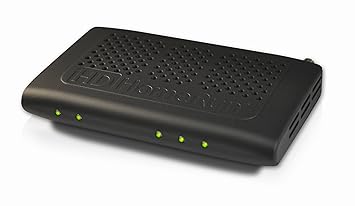
HDHomeRun Prime

This device connects to your network to "stream" your existing cable services, once you use a CableCard that you get from your "Cable" company(whether FIOS, Comcast, or any other cable, you'd actually see this 'card' in the back of your actual cable box), and attach your cable line to it.
There are 5 lights on this:

  • Power to the far left
  • Network is next
  • then the last 3...yes 3 are for the TunerS!!!
3 Tuners...what does that really mean?  Well every cable box you have in your house is a tuner on the cable input half of the box.  This means I am able to get 3 "cable boxes" for the price of one cable box rental fee!  That for me initially saves me from being charged an additional $21.90/month for 2 extra cable boxes!
Normally the cable output of a cable box goes to one TV, via HDMI cable.  This is restricted though as it is hard cabled to 1 defined TV.  This is where the Network comes in.  Now that the 3 Tuners are on the home network, almost and displaying device can view Live TV as long as there is an App for it.  What devices can I watch Live Cable TV inside my home network from?


    • My TV via 
      • either Amazon Fire TV(box or stick) using the HDHomerun App 
      • Xiaomi Mi Box using the HDHomerun App - Android TV 
      • Xbox One using the HDHomerun App
      • Playstation4 - or PS3 which also can decrypt DRM channels natively
      • Apple TV - I don't have this
    •  Apple Devices
      • iPad
      • iPhone
      • iPod
      • Mac OSX based
    • Android devices including my phone
    •  Many other DVR softwares
    I haven't tested Roku yet but there are ways to get this set up.  For more info see the HDHomerun Site


    The end result:  I can watch 3 live cable channels pretty much anywhere in the house, including outside, and paying for only the included cable box for HD.  Also with my cable services I also received an additional $8.30/month discount for using cable card vs a cable box for a theoretical savings of $30.20/month if i ever had 3 cable boxes previously.

    My current setup of choice at the TV is using Fire TV as I also have Amazon Prime so it makes a lot of sense.  I've been able to clean up around the TV stand as there no longer is a big cable box as you can attached the Fire TV boxes to the back of the TVs.  We just switch between apps like Netflix, Prime shows, or HDHomerun.  For the backyard I tend to use the MiBox and attach it to a projector out back.  I have wireless in the backyard so the signal stays strong.  This ensures a nice time watching NFL during the fall/winter by a fire and hopefully some BBQ.   The kids just use their gaming systems and choose the HDHomerun app and their system gives them live cable TV.


    Stay tuned for Plex..


    Friday, September 8, 2017

    Home Network - Fall 2017 Network Edition


    September 8 2017


    "The town Internet sucks!".  "The town wireless sucks!".  "I can't stream". I hear from various people, many in my town, that either have "bad wifi", the town Internet stinks, can't stream etc.  All things that probably aren't incorrect based on their perception.   But unfortunately most of the times these are not related to the cable Internet connection we pay for but tends to be our internal network is just not cutting it.  

    I've been trying to find a way to explain to an everyday person why I've done what I've done to set up my home network and other technology to "cord-shave" with a great level of service.

    Things I want to be able to do:

    • Watch TV shows or movies ANYWHERE and on any device, including outside
    • Be able to DVR without a monthly fee
    • Kids able to play their video games without complaining of lag
    • Still get channels on cable but not have to pay the fees for multiple cable boxes
      • I still watch sports and ESPN and our local sports station are difficult to get w/o cable.
    • Back up my computers over a good network, or minimize the need for storage data on a computer at all
    • Be able to add "Smart" devices without concern 


    Things I DON'T want to have to do anymore:

    • Have to reboot a device because it has to be done every so often(apart from doing a reboot after a software update, something we need to get in better habit of doing)
    • Get less than what I pay for related to Internet bandwidth
    • Have spotty wireless coverage for any device
    I do have a few first world challenges to face.  

    First, is my house is not a "box" as I have bedrooms above the garage, so that makes it weird to find coverage that radiates equally like if you drop a rock into the water(how the ripples of waves get less and less the further away from the center).  If you look at the picture below with the red/yellow/green/purple bands that will be helpful.
    I'm sure this might be similar to many houses in my town that started out smaller then expanded.


    Second, the microwave in the kitchen when ON, tends to knock out the 2.4Ghz when I had my old single All-In-One wireless router(an Asus AC68P, one of the highest rated AC based device for quite some time).

    Third, like many others we have either Apple products or others that can take advantage of the 5ghz bands.  This band allows much better speeds BUT cannot travel through walls very well.

    Fourth, my wife will not be happy if any of above is more difficult to use than old fashioned cable services. 😍

    I've actually deployed some wireless at one point when I was in corporate IT, and the big takeaway I had was to make sure you have enough access points to cover your building.  I don't think any business could get away with only one access point.  The crazy thing is most houses nowadays have MORE wireless needs than businesses but still are marketed to get a single "wireless router".

    So my list of needs involved for the network foundation

    1. Getting a real router to connect to the cable modem
    2. making sure I can still connect hard wired connection in either the basement or upstairs. That meant a network switch on each floor
    3. I'd need a way to connect the 2 switches as well.  This led me to MOCA technology - a means of bridging regular networking over cable COAX lines.
    4. get multiple access points to blanket coverage, the key was what brand and if I should go with stuff I can buy easily at Staples/BestBuy/etc - 'consumer equipment'.  All I knew I was NOT going to have that weirdness of multiple _EXT wireless SSIDs from the 


    My 5Ghz coverage(less range but better speed)


    My 2.4ghz Coverage(more range but slower)
    notice it radiates much further
    note: I did not enable the 2.4ghz band on the outside access point


    Please check the TV Edition for the Cord Shaving


    Monday, March 13, 2017

    IPSec VTI based tunnels on EdgeRouter Lite


    Some of my friends/coworkers either have or will have Ubiquiti products including the EdgeRouter Lite for their gateway to the Internet.  Naturally, we'd want a way to connect to each other, and getting the "network guy" involved means making it more complicated.


    Wednesday, February 15, 2017

    Home Network Updates - I love Change!


    I've been working on some improvements to the home network, and was going to prepare to make a clean wall mounted setup down in the basement for "telecom" gear.  I previously added MOCA to the house and started my road down the Ubiquiti path with a single AP and moved the Asus router to the basement.

    I ended up making some different decisions as my biggest problem was the wiring upstairs was messy.  In fairness I just never prioritized this as it worked.


    Rough before picture

    I already had AV equipment in the basement living room; a receiver, VCR(yes i still have one), and gaming systems namely one of the Xbox Ones.  This made it useful to have a switch closer to the Xbox so it can be wired.

    Well I turned in some change that we had at Coinstar and turned it into a no fee Amazon gift card.

    This allowed me to get another UAP-AC-PRO access point for downstairs, plus two switches that will end up being used in the basement and in the 2nd floor office; a pair of Ubiquiti US-8-60W with POE+, vlans, jumbo frames, and link aggregation(LACP).  This gives me most of the ports I'll need for a while in both locations.

    I had been reviewing a few blog sites and Troy Hunt's site Finally Fixed Dodgy WiFi,Richard Brynteson's  What I use: Unifi/Ubiquiti, as well as the Lowe Family's Installing Unifi Controller on Raspberry Pi for inspiration after initially purchasing the EdgeRouter Lite finally after all the grief I received by a certain German coworker friend to be name nameless for delaying buying the router.

    With all this information I ended up with the below configuration:
    New Ubiquiti gear


    At the entry to the cable service:
    Filter, MoCA "POE" Filter for Cable TV Coaxial Networking ONLY
    This is required to not "bleed" the MOCA signal outside your house, as it puts a block at the entry point.  It is highly recommended as it could both cause others problems and also let others into your internal network.

    2nd floor - the network entry point
    Actiontec Bonded MoCA 2.0 Ethernet to Coax Adapter ECB6200K02
    This was a device pair I learned about from my FIOS and Tivo using friends.  It helps get regular networking connections in places that may not be wired for Cat6 type cabling but does have Coax cable based wiring.  I'm more or less using it right now as a means to bridge the upstairs network to the basement.  It gets a Cable-in feed from basement, then the Cable-Out goes over to the cable modem. Then there is one network port that is connected to the switch below which is how it gets networking and "feeds" it into the coax cable line..magic!

    Cable Modem(provided by ISP): Cisco DPC3008 DOCSIS 3.0 
    I don't own this device as it is provided as part of my service with my municipal cable provider SELCO.  It is a reliable service and I quickly get local support IF I need it.  I do like that i get 2 DHCP external IP addresses, but I think it is really there to have people test their connections and not have to muck with DHCP databases.  Right now i get a 75mbps download/5mbps upload speed.  I'd like the upload speed to be a little higher but not going to complain.

    Ubiquiti EdgeRouter Lite for firewall/routing services
    This is where most people use "wireless routers", the all-in-one "The Homer"(look up "the homer car" on Google. its funny) style devices that do a little bit of this and a little bit of that but nothing great unless you spend over $150.  I had an Asus AC68p device before here which was great, but I like my config better the way it is set up, especially with all the internal television streaming inside my LAN.

    Ubiquiti US-8-60W switch
    This is one of the two switches i purchased.  It is a fully managed switch and is configured via the Unifi controller.

    Vonage VOIP adapter - if i can move that downstairs too I'll be happy.
    Just for standard phone service.  We still have that.

    My work computer
    Self explanatory

    Plex server/Monitoring server
    This is my DVR that works with the HDHomerun "Cable Box", plus it can stream a lot of movies both locally and any Plex-Friends media library.
    I also installed Cacti on this to trend out my network usage for bandwidth.

    Ubiquiti UAP-AC-Pro access point on the ceiling on 2nd floor
    One of 2 access points in the house, this one feeding the 2nd floor.  It is using one of the POE(Power of Ethernet) ports off the switch and mounted directly on the ceiling.

    Synology NAS 
    This is my file server. It is a 3TB mirrored array of 2 disks.  I'd love to get a newer one 4 bay device to end up with 8-12TB usable and dual nic for an LACP link, but that is a later date.


    After with my DIY Rack


    Basement:


    Actiontec Bonded MoCA 2.0 Ethernet to Coax Adapter ECB6200K02
    This is the other in a pair of MOCA bridge devices.  The Cable-In coax port is connected to the cable wiring and the Cable-Out is connecting to the HDHomerun "cable box".  The ethernet port connects to the switch below to complete the "bridge" with the networking upstairs.

    Ubiquiti US-8-60W switch
    This is the other switch that will serve all the devices downstairs including powering the access point(s) in the basement.

    Ubiquiti UAP-AC-Pro access point on the ceiling in basement living room
    The other of 2 access points in the house, this one feeding the both the basement and the 1st floor where it so close to the floor of 1st floor as it is mounted in the ceiling.  It is using one of the POE(Power of Ethernet) ports off the switch and mounted directly on the ceiling.


    SiliconDust HDHomerun Prime for allowing 3 cable feeds w/o a cable box. Awesome box!
    If you haven't looked at these devices, you should!  It is a cord shavers dream as it can reduce or eliminate the need for real cable boxes in your house.  It streams cable tv over your internal network using an app or other program that has the HDHomerun add-in.  There are apps for Android, Apple devices, Windows(desktop/laptops running windows 10, phone, or Xbox), Playstation3(natively can receive DRM channels) or PS4, Amazon Fire TV, Android TV and others.  We normally use Kodi with the HDHomerun add-in  on our Amazon Fire TV devices as it can also parse Closed Captioning where we have children with hearing loss and we try to have "the words" on whenever possible.
    I hear Kodi will be becoming a Windows UWP app which will make Xbox One one of the best streaming devices.

    Xbox One (wired)
    Since I place the switch in the basement close to the Xbox, it now is hard wired which makes for a much better experience especially with HDHomerun cable viewing.

    Raspberry Pi3
    I ended up building this as the Unifi controller to manage all the configuration of the switches and access points.  Had I used a Ubiquiti USG instead of the EdgeRouter Lite, ALL of the network configuration would be managed in this pane of glass.  It is connected via one of the POE ports as I bought a POE cable for the Pi 3.

    Media shelves
    with HDHomerun, switch above VCR,
    and Xbox One.  MOCA bridge is behind.


    What does this give me?  75mbps Internet anywhere in the main part of the house plus high quality cable streaming to almost any device I choose whether it is a TV, iPad, laptop, Xbox or other device... exactly as I hoped.

    I will likely look at other Ubiquiti Mesh products for the backyard as I'm sure we can have outside movie night by the fire in the non winter seasons.

    Friday, February 3, 2017

    Fire TV woes....gone(and be careful with other Amazon services)

    My journey into home streaming started out for two reasons:

    1. to see if I can get TV channels without being attached to a coax cable
    2. to use some streaming services as I do subscribe to Amazon Prime.  I will focus on this today as it relates to Fire TV devices.

    So awhile back i had purchased at least one FireTV stick(might be 1st gen, maybe 2nd) and now have two sticks but I also have a Fire TV box 2nd gen in the living room. To say it has been gathering dust is an understatement and quite frankly I gave up on Amazon devices.

    The original intent was great.  I could watch Prime services, Watch TV Everywhere service from my cable provider(general kudos to SELCO, another day) for many app based channels, and a few other things including local media streaming via Kodi(I don't really use add-ons at this time).

    Things worked great for some time.  Then one day I was looking at a second alternate backup method for my NAS and saw this great tool from Amazon called Cloud Drive.  I won't knock the product at this time BUT something weird did happen......

    I chose to back up my photos, full knowing I'd hit the 5GB free limit, and I did.  It was nice to see it at least be useful.  The only problem:  The Fire TV devices started complaining of Critically Low Storage.  I tried various things and even stopped the Cloud Photos and removed all the photos from Cloud Drive.  Still low storage.  I basically left them and switched to a Xiaomi Mi Box(http://www.mi.com/en/mibox/) - a great Android TV(Marshmallow based soon to be Nougat and will be much better).  This also put a delay on getting rid of my cable box ability.

    Other day I took a look at the FireTV as I KNOW others don't have this problem.  A coworker/friend practically swears by at least the box, not the stick. I reset to factory, only add Netflix(not logged in) and HDHomerun(didn't run it).  Sure enough after about 45 mins of just letting it sit there doing ABSOLUTELY NOTHING ......Critically Low Storage...queue the colorful language.

    So I check out Amazon Cloud Photos area again.  Hmm there is trash...the old photos are still there. WHAT THE _ _ _ _!!!! I do put in case/ticket request into both Amazon device support and Cloud storage.  I then start attacking as much of the files as I can.  KEY: I think this is where the issue might be that I had a bunch of videos taken on the phone that was backed up in the photos area.  My suspicion is that these could not show up as thumbnails they just sync'd down to the device.  I proceed to delete as much as my patience allows.

    Now i go back to the FireTV and do all the clear cache/clear data on the usual suspects(Appstore, Video, and Photos).  Sure enough it stays at about 4.3 gig free of 5.59.  

    I let it sit for the day. NO LOW STORAGE MESSAGE!!! 

    I then re-add all the key apps I wanted and now seems good!

    I think I like FireTV again as it is the primary "cable box" in the living room.  Bye Bye Cable company provided cable box!


    Home WIFI - time to start growing up


    My WIFI probably is considered better than most as many still have "N" or below based wireless access points and likely wireless routers.

    But with the amount of wireless streams including the fact that I stream my cable channels over my network, there needs to be an upgrade.

    My current setup:
    Upstairs:

    • ASUS RT-AC68P running in Access point mode(using RMerlin firmware) with
      • Internal 5ghz SSID
      • Internal 2.4ghz SSID
      • Guest 2.4ghz SSID
      • Guest 5ghz SSID

    Downstairs in basement:


    • ASUS RT-N66R running in Access point mode(using RMerlin firmware) with
      • Internal 5ghz SSID- different from above SSID
    There are other network details I'll note on different posts, but for sake of this I'll focus on wireless

    I have on order an AP from Ubiquiti, a UAP-AC-PRO-US "Enterprise grade" access point.  My initial thought will be for validation purposes is to do a shift of access points for better coverage and hopefully prepare to get more Ubiquiti APs for one cohesive system.

    I also want to try to get to a point of not needing 2.4ghz bands

    Phase I Plan

    Upstairs:

    • UAP-AC-PRO as primary house access point somewhere on 2nd floor - placement to be determined.
      • Internal 5ghz SSID
      • Internal 2.4ghz SSID - hoping to limit this if possible
      • Guest 2.4ghz SSID - separate vlan/subnet off router
      • Guest 5ghz SSID- separate vlan/subnet off router

    Downstairs in basement:

    • ASUS RT-AC68P running in Access point mode(using RMerlin firmware) with
      • Internal 5ghz SSID - different from above SSIDs and  separate channel from above
    Upstairs in bedroom over garage:


      • ASUS RT-N66R running in Access point mode(using RMerlin firmware) with
        • Internal 5ghz SSID- different from above SSIDs and  separate channel from above
      We'll see how things go when the new device arrives.....