(this is a work in progress...there WILL be updates)
Hopefully you've already read the foundation of Home Network - Network Edition and laying the foundation to be able to do more via the inside-the-house network. I wanted to separate the 'television' aspect as it includes a few different thoughts.
Prior to making changes I had only one cable box, plus a pair of DTA adapters which did not have HDMI outputs. It was fine but could only watch most of the digital or HD channels on one TV...and if i wanted to watch elsewhere i had 2 choices: increase my cable bill with more cable boxes OR literally lug around a cable box. Both situations were not what i wanted.
I talked with some of my tech friends/coworkers but not that many really did any "cord-shaving" yet outside of this crazy Brit who was doing Tivo on his FIOS connection. But that discussion did inspire me to think about things not necessarily about saving money but focus on value of services provided. I had been outside especially in the fall, and watching football games outside was both fun and frustrating as, at the time, I still had a tube style TV that was usable enough to move outside. I loved the ability to be outside etc but there HAD TO be a better way.
So I started down the route of just seeing what can be done to make it easier for outside, as had a 25 ft hdmi cable going outside a window and really didn't make sense. Being both cheap and somewhat tech-geek can be either good or a lot of trial and error which ends up costing more. For now I accepted that situation about me and pressed forward with tinkering. I went the cheap route and purchased a MediaSonic Homeworx digital TV tuner and a $30 GE indoor/outdoor antenna to TEST the ability to receive over the air signals, as I'm about 40 miles from the actual station antennas. I did get about 30 channels, some I'll never use. What i did get was the reality that less hassle TV outside was possible with limited extra cost. I was now. I now had a purpose....
So I likely continued conversations with the Brit, I'll call him Rev, about his Tivo setup. I really didn't like the price of Tivo, BUT I did like the feature of "streaming" my own cable especially for live TV. I wasn't overly concerned with DVR yet as we didn't use it now.
So I stumbled upon this device:
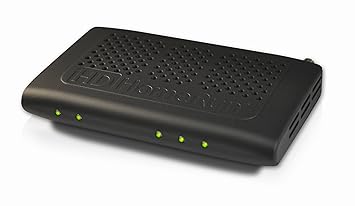 |
| HDHomeRun Prime |
This device connects to your network to "stream" your existing cable services, once you use a CableCard that you get from your "Cable" company(whether FIOS, Comcast, or any other cable, you'd actually see this 'card' in the back of your actual cable box), and attach your cable line to it.
There are 5 lights on this:
- Power to the far left
- Network is next
- then the last 3...yes 3 are for the TunerS!!!
3 Tuners...what does that really mean? Well every cable box you have in your house is a tuner on the cable input half of the box. This means I am able to get 3 "cable boxes" for the price of one cable box rental fee! That for me initially saves me from being charged an additional $21.90/month for 2 extra cable boxes!
Normally the cable output of a cable box goes to one TV, via HDMI cable. This is restricted though as it is hard cabled to 1 defined TV. This is where the Network comes in. Now that the 3 Tuners are on the home network, almost and displaying device can view Live TV as long as there is an App for it. What devices can I watch Live Cable TV inside my home network from?
- My TV via
- either Amazon Fire TV(box or stick) using the HDHomerun App
- Xiaomi Mi Box using the HDHomerun App - Android TV
- Xbox One using the HDHomerun App
- Playstation4 - or PS3 which also can decrypt DRM channels natively
- Apple TV - I don't have this
- Apple Devices
- iPad
- iPhone
- iPod
- Mac OSX based
- Android devices including my phone
- Many other DVR softwares
I haven't tested Roku yet but there are ways to get this set up. For more info see the HDHomerun Site
The end result: I can watch 3 live cable channels pretty much anywhere in the house, including outside, and paying for only the included cable box for HD. Also with my cable services I also received an additional $8.30/month discount for using cable card vs a cable box for a theoretical savings of $30.20/month if i ever had 3 cable boxes previously.
My current setup of choice at the TV is using Fire TV as I also have Amazon Prime so it makes a lot of sense. I've been able to clean up around the TV stand as there no longer is a big cable box as you can attached the Fire TV boxes to the back of the TVs. We just switch between apps like Netflix, Prime shows, or HDHomerun. For the backyard I tend to use the MiBox and attach it to a projector out back. I have wireless in the backyard so the signal stays strong. This ensures a nice time watching NFL during the fall/winter by a fire and hopefully some BBQ. The kids just use their gaming systems and choose the HDHomerun app and their system gives them live cable TV.
Stay tuned for Plex..
My current setup of choice at the TV is using Fire TV as I also have Amazon Prime so it makes a lot of sense. I've been able to clean up around the TV stand as there no longer is a big cable box as you can attached the Fire TV boxes to the back of the TVs. We just switch between apps like Netflix, Prime shows, or HDHomerun. For the backyard I tend to use the MiBox and attach it to a projector out back. I have wireless in the backyard so the signal stays strong. This ensures a nice time watching NFL during the fall/winter by a fire and hopefully some BBQ. The kids just use their gaming systems and choose the HDHomerun app and their system gives them live cable TV.
Stay tuned for Plex..


